JPEG-Repair, no SOS detected

A common error message that JPEG-Repair reports is ‘no SOS detected’. I have written several posts and made videos to repair JPEG photos in case the Windows photo viewers report errors: The old Windows photo viewer: File appears to be damaged, corrupted or is too large. The new Windows Photos: It looks like we don’t… Read More: JPEG-Repair, no SOS detected »

Alternative method for half grey or truncated JPEG photo repair

There are various examples on this website of repairs of half grey or truncated JPEG images. In those cases all image data is actually present, but due to an error or corruption only a part of it is visible. If data is simply missing because for example the file is partially overwritten or cut-off, repair… Read More: Alternative method for half grey or truncated JPEG photo repair »

The corrupt JPEGs that weren’t corrupt

Often I am asked to repair JPEGs that can be opened but don’t display correctly. Many of those look okay for some part, but turn into a grey area at some point. Repairing these files (or recovering them as we’ll see) isn’t always straight forward and sometimes requires some detective work. Half grey photos In… Read More: The corrupt JPEGs that weren’t corrupt »

In the wild corrupted photos and their fixes

It is true that these are close to impossible to repair using PhotoShop like editors because it’s the underlying data that is corrupt. It means standard photo restoration techniques fall short as they work with the data that is available. JPEG-Repair is a tool designed to remove the corrupt data.

RAW data recovery

RAW can mean several things with regards to data recovery; ‘You can recover your RAW photos from a SD Card with a RAW file system using RAW file recovery’. With regards to file and photo recovery, RAW data recovery can refer to three different things: The recovery method; RAW vs. file system based recovery It… Read More: RAW data recovery »

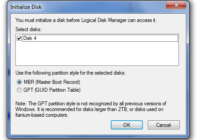
You must initialize the disk before Logical Disk Manager can access it

When Windows Disk Manager does not find partitions it will display the message “You must initialize the disk before Logical Disk Manager can access it”. In other words the hard disk, SSD or removable device is “unallocated” or not partitioned. What does this mean and how do you recover your data if you need to?… Read More: You must initialize the disk before Logical Disk Manager can… »