When repairing corrupted JPEGs recovered from failing SD cards or crashed hard drives, two specialized Windows utilities frequently come up: Anders Pedersen’s open-source JPEG Repair Shop (recently ported to .NET) and DiskTuna’s JAR – JPEG Auto Repair.
Ported from C++ to C#/.NET with various bug fixes and enhancements, the .NET version of JPEG Repair Shop supports header borrowing, restart markers, error-tolerant decoding, and bad-MCU detection. However, real-world testing shows that the two tools still differ significantly in automation, format support, and ease of use.
Quick Comparison: JAR vs. JPEG Repair Shop (.NET)
| Feature | JAR (JPEG Auto Repair) | JPEG Repair Shop (.NET) |
|---|---|---|
| Price & License | Free trial (full preview); €29 Home / €129 Pro (lifetime) | Free & Open Source (MIT License) |
| Availability | Ready-to-run standalone Windows app (no dependencies) | Released v1.0.0 binary, or compile current source with .NET 10 SDK |
| Automated MCU & Color Repair | 1-Click Automated + Precision Assisted Mode | Manual in v1.0.0; automated Fix all in current unreleased source |
| Image Quality / Compression | Lossless (repacks DCT blocks without pixel re-compression) | Lossless (repacks DCT blocks without pixel re-compression) |
| Corrupt / Missing Headers | Yes (rebuilds via intact reference photo) | Yes (borrows header from reference photo) |
| Invalid Markers & Stream Errors | Automatically strips & repairs corrupt fragments | Continues decoding; flags broken MCUs in red/orange |
| RAW Embedded JPEGs (CR2, NEF) | Yes (extracts & repairs embedded JPEG streams) | No |
| Ransomware (STOP/Djvu) Damage | Yes (strips encrypted blocks + header transplant) | No dedicated support |
| Progressive JPEGs | No (baseline sequential JPEGs only) | No (baseline sequential JPEGs only) |
| File Diagnostics | Built-in byte entropy & recoverability check | Lists stream error offsets |
Key Technical Differences
1. Automated Repair: Released JAR vs. Unreleased “Fix All”
In the officially released JPEG Repair Shop (.NET) v1.0.0, repairing a photo is entirely manual: you locate visual breaks and click Insert blank MCU, Remove MCU, or Fix colours step by step. In the current unreleased GitHub source code (as of November 22, 2026), Pedersen added an automated Fix all feature that inserts/removes MCUs and adjusts colors automatically—though using it currently requires compiling the project yourself with the .NET 10 SDK.
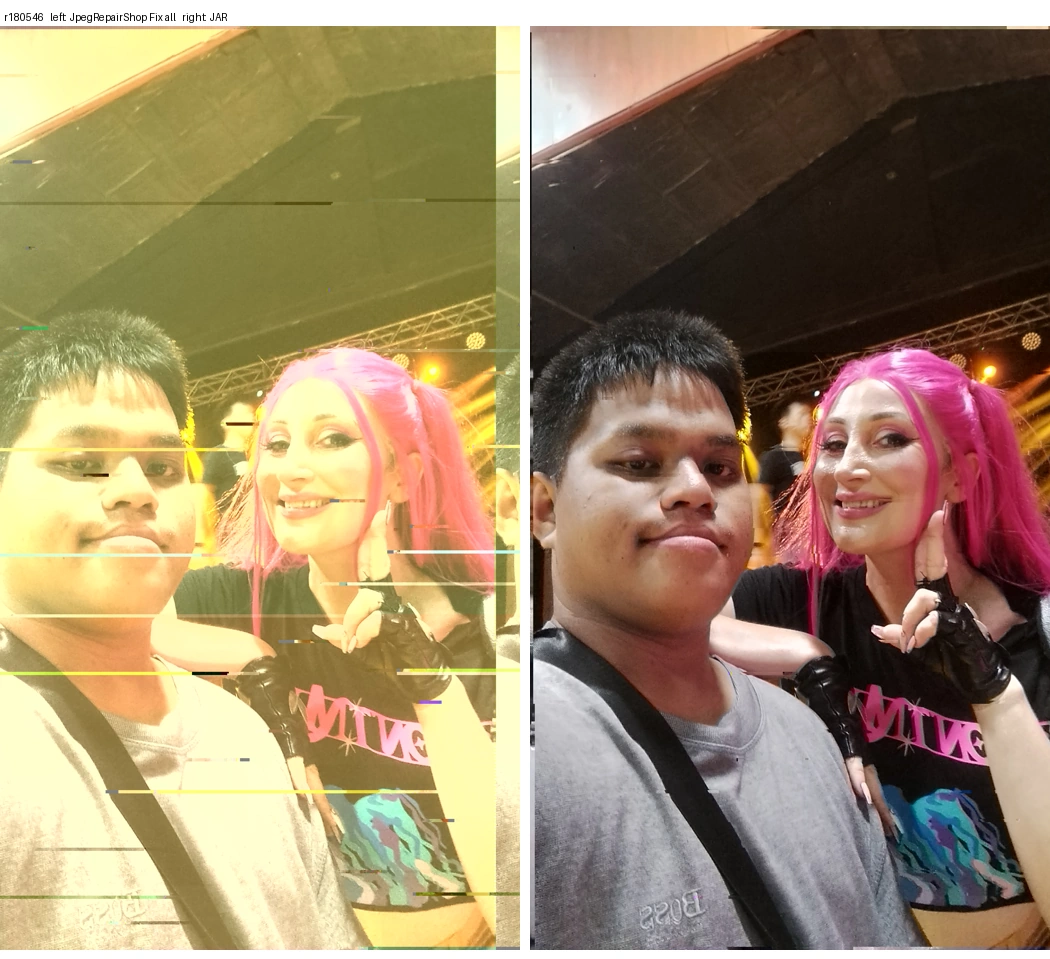
JAR (JPEG Auto Repair) ships as a ready-to-run Windows application with mature one-click automation (Analyse and Repair) JAR (JPEG Auto Repair). It scans the file, strips out stray sectors and corrupt byte sequences, realigns shifted MCUs, and balances color offsets automatically. In our test on 18 (real-world) damaged photos, JAR was clearly better on 11, similar on 4, JPEG Repair Shop did better on 2, and 1 was unrecoverable by either tool. For stubborn spots, JAR also includes a Precision Assisted Mode so you can fine-tune individual gaps without losing what the automatic engine already fixed.
2. Format Scope, Ransomware Recovery & Diagnostics
While both tools are lossless at the image level—repacking quantized DCT coefficients at the Huffman entropy layer rather than decoding to pixels and re-compressing—JAR is built for broader data recovery and forensic workflows:
- RAW Embedded JPEGs: JAR can extract and repair embedded JPEG image streams from corrupt RAW files (
CR2,NEF), whereas JPEG Repair Shop only opens standalone JPEGs. - Ransomware (STOP/Djvu) Recovery: JAR includes dedicated tools to strip partially encrypted chunks and transplant valid headers from reference photos.
- Byte-Entropy Diagnostics: JAR analyzes file entropy upfront so you can tell whether recoverable compressed image data actually remains inside a file before spending time on repairs.
Which Tool Should You Use?
- Choose JPEG Repair Shop (.NET) if: You want a free, open-source MIT tool, don’t mind manual MCU editing in v1.0.0 (or compiling the latest source with the .NET 10 SDK), and are repairing standalone baseline JPEGs.
- Choose JAR (JPEG Auto Repair) if: You want a ready-to-run Windows app with proven 1-click automated MCU and color repair, need to salvage files with stray sectors or foreign data, or are recovering embedded JPEGs from corrupt RAW files and ransomware attacks. Download the free JAR trial to preview the automated repair on your own photos.
Frequently Asked Questions (FAQ)
Does JPEG Repair Shop (.NET) repair JPEGs automatically?
Not in the released v1.0.0 binary, which requires manually inserting/removing MCUs and fixing colors by hand. Pedersen added an automated Fix all function in the unreleased GitHub source code (as of November 22, 2026), which requires compiling with the .NET 10 SDK. JAR includes full one-click automated repair out of the box, plus an assisted mode for manual fine-tuning.
Do JAR or JPEG Repair Shop reduce image quality when saving?
No. Neither tool decompresses the photo to RGB pixels and re-compresses it. Both JAR and JPEG Repair Shop work directly on the quantized DCT blocks and repack them at the Huffman entropy layer, making both lossless with respect to image quality. (JPEG Repair Shop warns against re-editing a saved file simply because the original damaged stream data is replaced once saved, not because of quality loss.)
Can both tools fix JPEGs with damaged or missing headers?
Yes. Both JAR and JPEG Repair Shop (.NET) allow you to rebuild or borrow a valid JPEG header using an intact reference photo taken with the same camera and settings.
Can either tool repair progressive JPEGs or corrupt RAW files?
Neither tool supports progressive JPEGs—both are designed for baseline sequential JPEGs (which digital cameras and smartphones use). However, JAR can extract and repair embedded JPEG image streams from corrupt RAW files such as CR2 and NEF, whereas JPEG Repair Shop (.NET) cannot.