Photos Full of Errors? Check for a Faulty Card Reader
Meta description: Many photos corrupted at once, all in the same odd way? A faulty card reader or USB adapter may be the cause. How to spot it with JAR’s bit balance panel.
Quick answer: When many photos from one card or drive are damaged at once, the cause is often not the files but the hardware they were copied through: a faulty card reader, USB adapter, cable or drive. JAR recognises the traces such hardware leaves and warns you. Stop using that reader, and copy the files again through another one while you still can.
Signs that hardware is the cause
- Many or all photos from one card are damaged, not just one or two.
- The damage looks alike in every photo: fine noise or speckles over the whole picture, or wrong colours everywhere, instead of one damaged band.
- Photos that were fine before are damaged after copying them again.
Step 1: read JAR’s warning
Open one of the photos in JAR and click Analyse. Watch the status line:
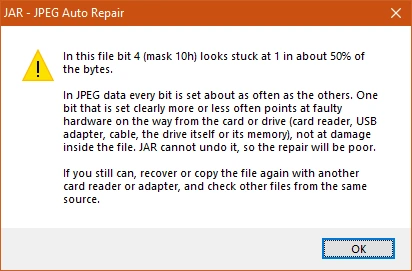
- Stuck bit warning. One bit in the data was stuck at 0 or 1 on the way, in a part of the bytes or in all of them. That damage runs through the whole photo and can’t be undone, so the repair will be poor, and JAR doesn’t offer Smooth scars.
- USB command sectors removed. A faulty card reader or adapter wrote its own commands into the data. JAR removes them and repairs what is lost, often very well, but every photo copied through that reader has the same problem. [Screenshot: the status line with USB command sectors removed]
Step 2: look at the bit balance panel
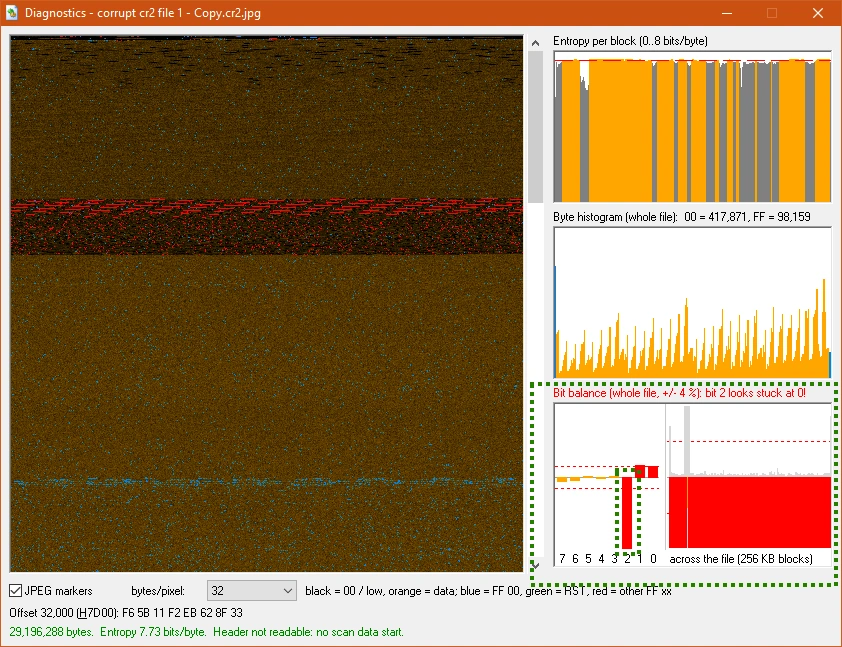
- Choose Tools > Byte map, entropy, histogram… and look at Bit balance (bottom right).
- Left part: one bar per bit, 7 to 0. In a healthy photo they all stay close to the centre line. A red bar past the dashed lines points at a stuck bit. The title says OK or names the bit.
- Right part: the same check across the file, start on the left. A fault through the whole file shows as a band on one side of the centre line; a fault in part of the file shows as spikes.
Step 3: do this next
- Stop using that card reader, adapter or cable.
- Copy the files again through another reader, or straight from the camera, if you still can. A copy through healthy hardware is often undamaged.
- Check other files from the same source. Batch mode (Pro) notes a stuck bit and USB command sectors in its log for every photo, so you see at a glance which ones were affected.
FAQ
Can JAR repair a photo with a stuck bit? Only poorly: the damage is in every byte. Copying the file again through other hardware is the real fix.
And photos with USB command sectors? Usually well, often without a trace. But the reader is still faulty: replace it.
Is my card broken? Not necessarily. Most often it’s the reader or the adapter. Try the card in another reader before giving up on it.