Not every corrupted JPEG can be repaired. Check in a minute whether your photo still holds image data, using JAR’s byte map and entropy view. Free.
Quick answer: A photo can only be repaired if its image data is still in the file. If the photo opens but looks wrong, the data is there. If it doesn’t open at all, you can’t tell from the outside: it may be a damaged header with the whole photo behind it, or a file full of zeros. JAR’s byte map and entropy view show which, in a minute, for free.
What you can tell without opening anything
- The photo opens but looks wrong (grey areas, shifted bands, wrong colours): the image data is there. The chances are good: see [How to repair a corrupted JPEG photo](link to guide 1).
- The photo doesn’t open, or Windows shows a generic icon: nobody can tell in advance. Check it with the steps below, or simply try a repair.
Look inside the file
- Open the photo in JAR and choose Tools > Byte map, entropy, histogram…
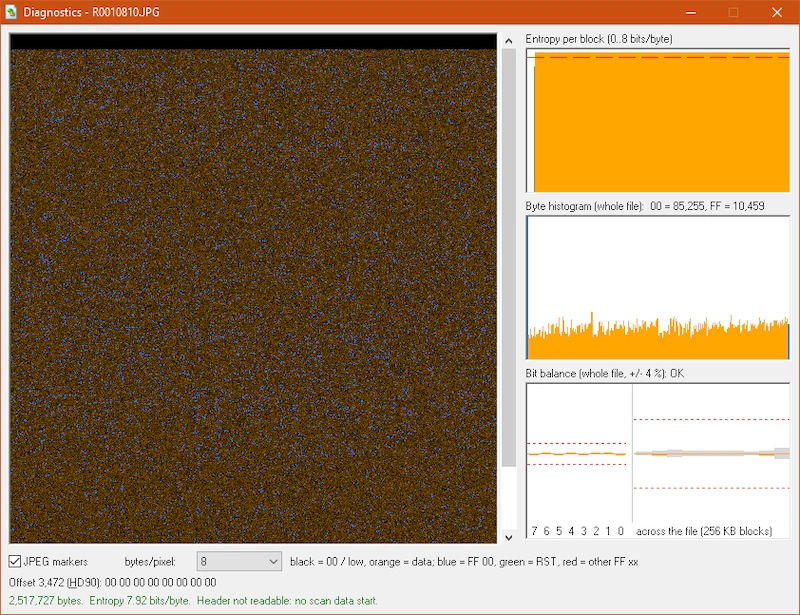
- Read the byte map (left). Each pixel stands for a few bytes of the file, from top to bottom.
- Even, fine noise: compressed data, the way JPEG image data looks.
- Black: zeros. Nothing there.
- A regular pattern or a different texture: something else, such as part of another file. [Screenshot: a healthy byte map next to one that is mostly black]
- Read the entropy graph. It shows how random the data is, from 0 to 8. JPEG image data stays close to 8 from the blue line (where the image data starts) to the end. A long dip means something else sits there. [Screenshot: entropy of a healthy photo and of a damaged one]
- Glance at the histogram. In a healthy photo it is nearly flat. Tall spikes mean data that isn’t JPEG.
- Optional: turn on JPEG markers. Red marks inside the image data are damage. JAR’s clean-up removes them, so a few red marks are no reason to worry.
What the result means
| What you see | What it means |
|---|---|
| Even noise, entropy close to 8 throughout | Image data is there. Try the repair. |
| Mostly even noise with black or patterned stretches | Part of the photo is there. JAR repairs what is left; the rest is filled. |
| Black, or entropy low from top to bottom | No image data. No repair tool can bring this photo back. |
| Even noise throughout, but the photo never opens | Possibly encrypted (some phones encrypt photos on the card). JAR recognises the common cases and says so. |
FAQ
Is checking free? Yes. The diagnostics window works in the trial, and so does the full repair preview.
The file is full of zeros. Is there anything I can do? Not with the file itself. Try recovering it again, or look for another copy: a backup, the cloud, a messaging app.
Why does a recovered photo hold the wrong data? Recovery programs sometimes put a file together from the wrong pieces of the card. Then the image data is partly or completely from another file.